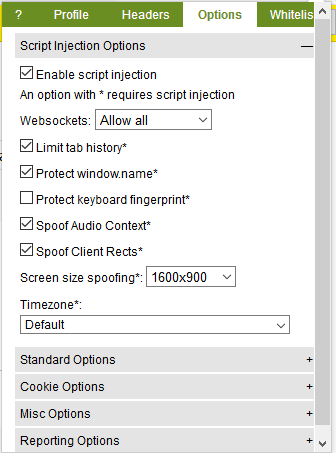
Script Injection Options
Enable Script Injection
This option enables script injection. Script injection is required if you want to use some of the features in this tab such as disabling WebSockets, spoofing your screen size, and your browser fingerprint.
WebSockets
- Allow all websockets
- Block all 3rd party websocket connections. (different domains)
- Block all websockets
Limit tab history
Spoof tab history number in the window History API.
Protect window.name
Can be used to track you across domains. Sets the value of this property to an empty string. More info can be found here.
Protect keyboard fingerprint
The way you type can be used to fingerprint you. If you enable this option, your input may lag (depends on your typing speed). There is a small delay between each keystroke you make.
Spoof Client Rects
Visit here to learn more about client rects. When this option is enabled, Chameleon will slightly modify the values returned. Give it a try!
If you're using CanvasBlocker, please make sure that the dom rects option is disabled. It can cause issues with some websites.
Spoof Screen Size
Spoof your screen size. The options below:
| Option | Action |
|---|---|
| Default | Your real browser screen size. |
| Profile | A screen size based on your selected browser profile. |
| All other values | The screen resolution to spoof. |
Timezone
Select the timezone you'd like to spoof. You should use this option if you're using proxies with an IP in a different timezone.
If 'IP' is selected, Chameleon will make a request to https://ipapi.co to get the correct timezone based on the IP address of the browser. This request is made when starting Firefox and when selecting the IP option. Chameleon will not periodically check your IP to update your browser.
Spoofing limitations
- Timezone spoofing only works with browsers with an English locale.
- Timezone spoofing will only spoof dates created with the
Dateconstructor without any arguments. This limitation was added to minimize breaking 3rd party libraries that built uponDate.
Standard Options
These features are provided by the privacy.websites WebExtension API.
Enable first party isolation
This option will break some sites!
First party isolation isolates third party cookies to the domain in the address bar. Used to prevent third party cookies from tracking you across domains. This is one of Tor's features that was introduced in Firefox 52. More info can be found here.
Enable resist fingerprinting
This option will break some sites!
Resist fingerprinting makes the browser report generic information. It will disable some features that can be used to uniquely identify you (WebSpeech, Navigator, local time, etc). If you're using this feature, don't use script injection. More info can be found here.
Tracking protection mode
- On - Enable tracking protection
- Off - Disable tracking protection
- Enabled in private browsing - Only enable in private windows
WebRTC Policy
This option can break some sites!
| Option | Action |
|---|---|
| Default | Show all interfaces |
| Use Public and Private interface | Use default route, exposes private associated private address |
| Only use Public interface | Hide private IP address |
| Disable non-proxified UDP | Disable WebRTC unless using UDP proxy |
Cookie Options
Cookie Policy
Options:
Allow all
Allow all cookies
Block all
Block all cookies
Block 3rd party
Block all 3rd party cookies
Allow 3rd party from visited
Accept a third-party cookie only if the cookie's top-level domain already has at least one cookie.
Reject trackers
Reject cookies from trackers.
Misc Options
These options cannot be toggled by Chameleon. You can change them using about:config. Be careful, while these options may enhance your privacy, your browsing experience will be degraded. I'm not sure what Mozilla was thinking when some of these feaures were added to Firefox.
-
Block active mixed content
If the page is delivered via HTTPS, HTTP content from certain tags (script, iframe, link, XHR, fetch, object) are blocked. Can break sites. Set value to true. -
Block display mixed content
If the page is delivered via HTTPS, HTTP content from certain tags (img, audio, video, and object subresources) are blocked. Can break sites. Set value to true. -
Disable Battery API
Gives information about your battery's charge level and status. Deprecated. Set value to false. -
Disable Browser Pings
Ping websites when clicking link. Set value to false. -
Disable Browsing and download history
Self-explanatory. Most users will not want to disable this feature. Set value to false. -
Disable CSS visited links
Can leak your visted links. More info here: https://dbaron.org/mozilla/visited-privacy Set value to false. -
Disable Cache (disk)
Self-explanatory. Most users will not want to disable this feature. Set value to false. -
Disable Cache (memory)
Self-explanatory. Most users will not want to disable this feature. Set value to false. -
Disable Clipboard Events
Disabling this feature prevents websites from getting notifications when a user copies, cuts, or pastes something from a page and what has been selected. Will break a few sites if you disable this. (Google Docs) Set value to false. -
Disable Context Menu Events
Disables right click. Will break some web applications. Set value to false. -
Disable Device Sensors
Can be abused to track users and learn about a user's behavior. More info here: https://www.techrepublic.com/article/mozilla-blocks-spy-apis-from-firefox-mobile/ Set value to false. -
Disable DNS prefetch
This feature allows Firefox to proactively perform domain name resolution. Can potentially leak some information. Set value to true. -
Disable DOM storage
Disables local storage. Will break many sites. Set value to false. -
Disable DRM
Disables DRM support. Will break some sites (Spotify, Netflix, etc). Set value to false. -
Disable Gamepad API
Disable the Gamepad API. Set value to false. -
Disable Geolocation
Self-explanatory. This information can be very precise! Set value to false. -
Disable Geolocation 2 (set to empty string)
In addition to the option above. Set value to empty string. -
Disable Offline cache
Disable caching when using offline browsing Set value to false. -
Disable PDF.js
Disable PDF.js Set value to true. -
Disable Pocket
Disable Mozilla's Pocket service. Set value to false. -
Disable Resource Timing
Disable resource timing. Set value to false. -
Disable Search Suggestions
Disable search suggestions. Set value to false. -
Disable Search Updates
Disable search engine update checks. Set value to false. -
Disable SSL Session Identifier
Disables SSL Session identifier. Create a new boolean entry in about:config with the name security.ssl.disable_session_identifiers and set the value to false. -
Disable SSL False Start
Disables SSL False Start. Set value to true. -
Disable TLS 0-RTT
Disables TLS 0-RTT. Set value to false. -
Disable Trusted Recursive Resolver
Disables Trusted Recursive Resolver. In the near future, Firefox will enable DNS-over-HTTPS (DoH) by default and use Cloudflare as the DNS resolver. Disabling this option allows you to use your existing DNS provider. You can also change the DoH endpoint if you don't want to use Cloudflare. Set value to 5. -
Disable WebGL
Will break some games. Not neccessary. Set value to true. -
Disable Web Beacons
https://en.wikipedia.org/wiki/Web_beacon Set value to false. -
Enable clear offline apps on shutdown
Clear offline website data Set value to true. -
Limit detectable fonts
Limiting fonts blocks regular fonts from being downloaded. Set value to 0 to limit fonts. -
Use click to play for plugins
  Self-explanatory.

  Set value to true. (Default option is true but you might want to double check)
Reporting Options
-
Disable data submission
Self-explanatory Set value to false. -
Disable safe browsing downloads check
Don't download malware blacklists and don't check downloads. Set value to false. -
Disable safe browsing downloads check 2
In addition to the option above. Set value to false. -
Disable safe browsing downloads check 3
In addition to the option above. Set value to false. -
Disable safe browsing downloads check 4
In addition to the option above. Set value to false. -
Disable safe browsing malware check
Disable malware check. Set value to false. -
Disable safe browsing phishing check
Self-explanatory. Set value to false. -
Disable health report uploads
Self-explanatory. Consider leaving this enabled if you want to help make Firefox a better browser. Set value to false. -
Disable crash report
Self-explanatory. Consider leaving this enabled if you want to help make Firefox a better browser. Set value to false. -
Disable telemetry report
Self-explanatory. Consider leaving this enabled if you want to help make Firefox a better browser. Set value to false. -
Disable telemetry report 2
In addition to the option above. Set value to false. -
Disable telemetry server
  In addition to the option above.

  Set value to blank.