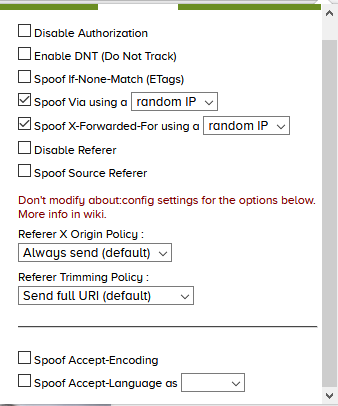
Disable Authorization
This option disables sending the Authorization header. This may break some single page applications that use this header to communicate with an API and it will break websites that require authentication with a username and password (HTTP authentication, not the regular login page). More information about this header can be found here.
Enable DNT (Do Not Track)
Enables Do Not Track in the header. This DOES NOT mean that you will not get tracked on the web. By enabling this option you are expressing that you prefer not to be tracked. You will have to trust the server to honor your request. More info can be found here.
Prevent Etags tracking
Etags are used to control how long files are cached by the browser. They can be used to track you online without cookies. More info can be found here.
Spoof Via / X-Forwarded-For
You can fool several sites that obtain your IP address from the Via / X-Forwarded-For header fields. This does not work on most sites but it does for a few.
Enable both options with Chameleon and visit one of the pages listed below:
Spoof Accept-Encoding
Spoof accept encoding to: gzip, deflate. More information can be found here.
Spoof Accept-Language
Spoof accept language to the selected value. This may change the language of the content returned to the browser. For example, changing Youtube's language between English and Chinese regardless of IP. More information can be found here.
Referer Options
The referer header field is used to determine where the requested page was linked from.
Do not modify this value in about:config It will prevent Chameleon from working correctly.
For example, clicking a search result on search engine X will let the site Y know that the visitor came from search engine X.
Disable Referer
Disables the referer header. Can break some sites that restrict access to a page depending on the referer.
Spoof Source Referer
Sets the referer to the requested URL.
X Origin Policy
Do not modify the about:config setting network.http.referer.XOriginPolicy!
Always send
Always send the referer for X Origin requests
Match base domain
Only send X Origin request if base domain matches.
The referer will be sent for the urls:
- example.com
- news.example.com
- blog.example.com
They URLs above share the same base domain: example.com
Match host
Only send X Origin request if hostname matches.
The referer will be sent for the urls:
- news.example.com/1
- news.example.com/2
The URLs above share the same hostname: news.example.com
Trimming Policy
Do not modify the about:config setting network.http.referer.trimmingPolicy!
Send full URI
Sends the full referer.
Scheme, host, port, path
Sends the scheme, host, port and path of the URL; strips query strings.
Before: https://example.com:8080/page?privacy=false&trackingid=XYZ After: https://example.com:8080/page
Scheme, host, port
Sends the scheme, host, and port of the URL.
Before: https://example.com:8080/page?privacy=false&trackingid=XYZ After: https://example.com:8080/
Upgrade Insecure Requests
Sends a request header to upgrade insecure HTTP requests, Lets the server know that the browser prefers HTTPS.